Live Streaming · Gaming
Already have the gaming PC?
Do not start by buying another camera.
For a normal one-person gaming stream, we would spend around the desk first: put the microphone close, give the face its own light, and make OBS easier to operate. Add HDMI capture if you already own a suitable camera. Buy a new camera only when the webcam is the thing visibly holding the stream back.
Visual setup · live catalogue photography
See the core gaming desk before you shop it
A close voice path, a way to hold that microphone in position and one deliberate face light are the physical core. Every object below is a current catalogue product, not a stock-photo prop.
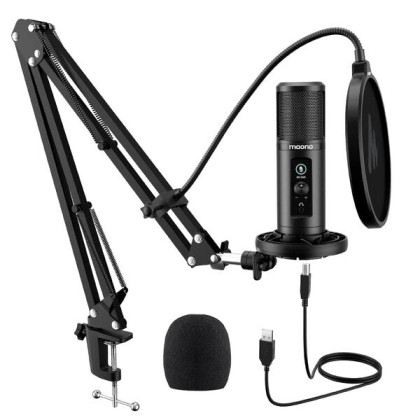 Voice [DEC SALES] MAONO AU PM422 Podcast Microphone AU-PM422
Keep the microphone close enough to beat keyboard and room noise.
Voice [DEC SALES] MAONO AU PM422 Podcast Microphone AU-PM422
Keep the microphone close enough to beat keyboard and room noise.
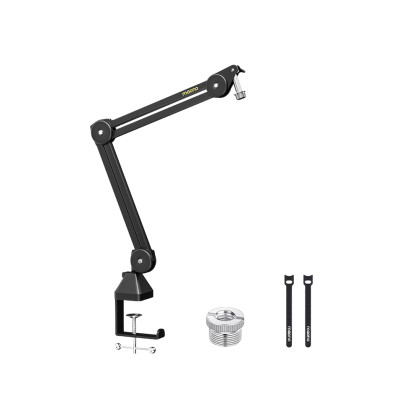 Position [AUGUST SALES] Maono BA37 Microphone Suspension Boom Arm Stand
Hold the microphone where it works without taking over the mouse/keyboard area.
Position [AUGUST SALES] Maono BA37 Microphone Suspension Boom Arm Stand
Hold the microphone where it works without taking over the mouse/keyboard area.
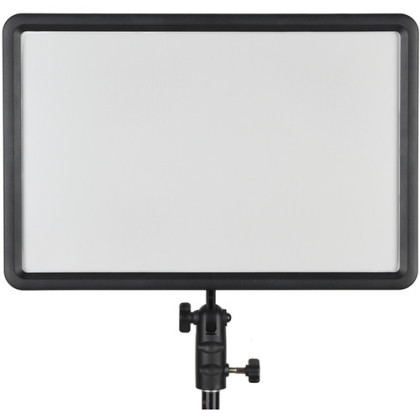 Light Godox LEDP260C Bi-Color LED Light Panel
Give the face its own repeatable light instead of relying on monitor glow.
Light Godox LEDP260C Bi-Color LED Light Panel
Give the face its own repeatable light instead of relying on monitor glow.
Price, stock, warranty, condition and pre-owned availability are live from the Altech catalogue.
Start from what is already on the desk
Three gaming-stream starting points need three different shopping lists.
The useful question is not “what is the best streaming kit?” It is which part of your current desk is making viewers work harder to see or hear you.
Core desk · buy only the roles you are missing
Start here: voice, microphone position and one face light
These three roles form the practical base for a one-person gaming stream. They improve what the audience hears and sees without adding another video source or another layer of software.
New
USB voice mic
Maono
[DEC SALES] MAONO AU PM422 Podcast Microphone AU-PM422
Why we'd pick it
A simple computer-first microphone for a fixed gaming desk, with direct USB connection and monitoring controls instead of a camera-oriented wireless path.
Watch out for
A condenser mic still hears the room; keep it close and control keyboard/fan noise.
In stock
MYR359.00
View product →
New
Mic positioning
Maono
[AUGUST SALES] Maono BA37 Microphone Suspension Boom Arm Stand
Why we'd pick it
The inexpensive part that lets the microphone stay close to the mouth without occupying the keyboard/mouse area.
Watch out for
Check desk thickness and where the arm can swing before buying.
In stock
MYR139.00
View product →
New
Face light
Godox
Godox LEDP260C Bi-Color LED Light Panel
Why we'd pick it
A compact bi-colour panel for putting consistent light on the face instead of depending on monitor glow or a ceiling light.
Watch out for
It still needs sensible placement; brighter is not automatically better.
Warranty 3 Months Shop Warranty
In stock
MYR339.00
View product →
Price, stock, warranty, condition and pre-owned availability are live from the Altech catalogue.
Reviewed by
Altech Camera team · Kuala Lumpur
Last reviewed 18 September 2026
How we maintain this guide
We separate a gaming stream into the parts a shopper can actually improve: voice, microphone position, face lighting, control, capture and camera. The page uses current Altech catalogue products for those roles and keeps the camera as an optional upgrade rather than the default starting point.
Shop in Kuala Lumpur
Build a gaming streaming desk in Kuala Lumpur
Altech Camera in Kuala Lumpur carries USB microphones, boom arms, face lighting, Elgato capture/control gear and creator cameras for gaming streams. Start with the missing desk role; do not replace a working camera just to make the setup look more “streaming”.
Altech Camera · Kuala Lumpur
Altech Camera Lot 0639, Level 6 (West), Berjaya Times Square, No. 1, Jalan Imbi 55100 Kuala Lumpur, Malaysia Call +60129315510
Buying rule
Stop after mic + boom + light if the stream already feels clear and easy to run.
Add Stream Deck only when repeated live actions cost attention. Add Cam Link only when a compatible HDMI camera is actually entering the PC.
Conditional add-ons · not starter requirements
Add these only when the workflow asks for them
Stream Deck solves repeated live-control friction. Cam Link solves one specific signal-path job: bringing an existing compatible HDMI camera into the computer. Neither is automatically part of every gaming desk.
 New
New
Only if control is repetitive
Elgato
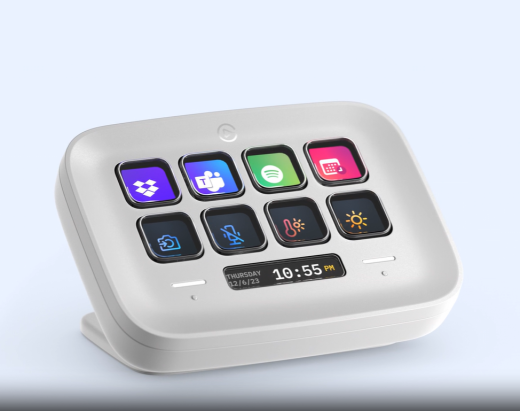
ELGATO Stream Deck Neo (8x Customizable LCD Keys + 2x Touch Points)
Why we'd pick it
Useful when mute, scenes, media and common stream actions are happening often enough that keyboard shortcuts and mouse hunting become friction.
Watch out for
Do not buy a control surface for actions you rarely use.
Warranty 2 Years Warranty
In stock
MYR589.00
View product →
 New
New
Only if you already use HDMI
Elgato
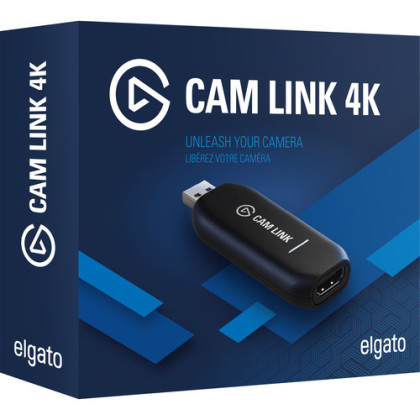
Elgato Cam Link 4K (HDMI Input For Mac / Windows , Video Capture Card)
Why we'd pick it
The bridge to add an existing compatible HDMI camera to a software-led PC stream.
Watch out for
It is not a camera upgrade and does not help unless your camera has a suitable clean HDMI output.
Warranty 3 Months Shop Warranty
In stock
MYR579.00
View product →
Price, stock, warranty, condition and pre-owned availability are live from the Altech catalogue.
When the webcam is finally the limit
Upgrade the face camera as a camera + lens decision.
A camera body cannot fix a room that is too tight for the lens. For a desk, measure the actual camera-to-face distance first. The wide lens may be the part that makes an interchangeable-lens camera usable.
Optional camera step
Only take the camera route when the webcam is actually the weak link
This is not the starter list. It is the next step for a streamer whose audio, light and PC path are already under control and who now needs better framing, focus or image quality from the face camera.
![[USED] Sony ZV-E10 II Body Only ( 99% Like New with Box ) / ZVE10M2 ZVE10II ZVE10 Mark II ZVE10 M2 ZVE10 2](https://s3-ap-southeast-1.amazonaws.com/altech-prod/uploads/public/6ab/74c/24d/thumb_120764_520_420_auto.jpeg) Pre-Owned
Pre-Owned
Interchangeable-lens face camera
Sony
[USED] Sony ZV-E10 II Body Only ( 99% Like New with Box ) / ZVE10M2 ZVE10II ZVE10 Mark II ZVE10 M2 ZVE10 2
Why we'd pick it
A compact creator body that can double as a streaming camera and recorded-content camera, instead of being locked to the desk.
Watch out for
The body still needs the right lens, power and capture path; buying it alone does not finish the setup.
Condition Pre-loved
Warranty 1 Month Shop Warranty
In stock
MYR3,090.00
See this actual unit →
![[OCT SALES - TNG RM100] Sony E 11mm F1.8 Lens](https://s3-ap-southeast-1.amazonaws.com/altech-prod/uploads/public/6ac/60b/c76/thumb_121403_520_420_auto.jpg) New
New
Tight-room facecam lens
Sony
[OCT SALES - TNG RM100] Sony E 11mm F1.8 Lens
Why we'd pick it
A genuinely wide Sony APS-C prime when the monitor/desk will not let the camera move far enough back.
Watch out for
The fixed ultra-wide view is specialised; choose it because the room needs it, not as a general-purpose lens.
Warranty 1 Year + 1 Year Sony Malaysia Warranty
In stock
MYR1,950.00
View product →
Price, stock, warranty, condition and pre-owned availability are live from the Altech catalogue.
Before checkout
Make sure the missing small parts do not break the setup.
The product card is not the whole signal path. Confirm what your exact camera, desk and PC still need before ordering.
HDMI compatibility, cable and long-session power
Cam Link only makes sense when the camera output is suitable. Confirm the HDMI connector/cable and how the camera will be powered through a real session.
Already own the camera? Bring the exact model/SKU into the decision.Desk clamp, arm reach and keyboard position
A boom arm is useful only if it can clamp to the desk and place the microphone close without blocking normal gaming movement.
Measure the desk before choosing the arm position.Stand/mount and where the panel can sit
A panel pointed straight at the face from the wrong place is not automatically flattering. Leave room to place it above/side of the screen rather than directly behind the monitor.
Shop the light and the mounting plan together.Keep the scene collection simple first
If the stream is already unstable, another camera source adds load rather than fixing it. Stabilise the game + OBS path before expanding the production.
Do not buy around a performance problem you have not isolated.Broader shopping paths
Need an alternative to the exact picks above?
Use these category routes by role, not as a shopping list to buy all at once.
Not actually gaming?
Use the page that matches what the host is doing.
Facecam is for camera/lens geometry. Just Chatting is for a host-led conversation. Solo Host is the broader one-person production workflow.