Live Streaming · Just Chatting
The host is the content.
Spend on voice and presence first.
For a fixed Just Chatting desk, we would rather put a good USB mic close to the host, mount it properly and light the face than start with a new camera or wireless lav kit. The picture matters, but the audience is listening to one person for a long time.
Visual setup · voice, position, face
A host-led stream should look like a calm desk, not a control room
For Just Chatting, the most useful visual is the relationship between the microphone, its position and the face light. Camera complexity comes later.
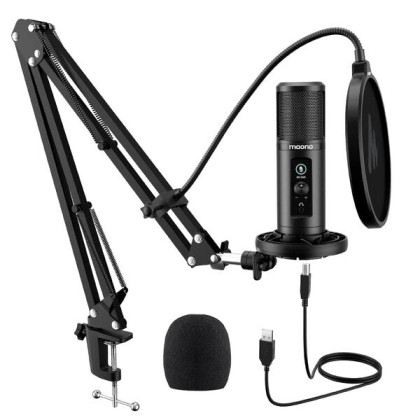 Voice [DEC SALES] MAONO AU PM422 Podcast Microphone AU-PM422
One close host voice is the centre of the show.
Voice [DEC SALES] MAONO AU PM422 Podcast Microphone AU-PM422
One close host voice is the centre of the show.
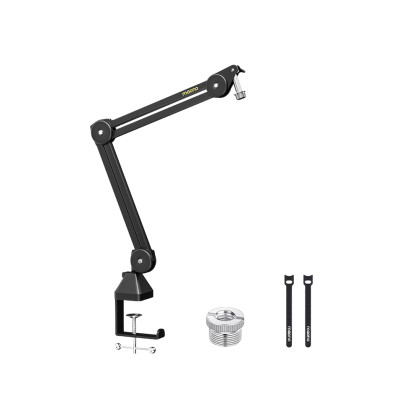 Position [AUGUST SALES] Maono BA37 Microphone Suspension Boom Arm Stand
Keep the microphone near the host without crowding the desk.
Position [AUGUST SALES] Maono BA37 Microphone Suspension Boom Arm Stand
Keep the microphone near the host without crowding the desk.
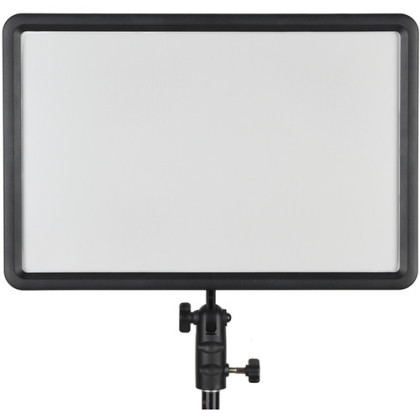 Face light Godox LEDP260C Bi-Color LED Light Panel
Keep the host consistently lit through a long conversation.
Face light Godox LEDP260C Bi-Color LED Light Panel
Keep the host consistently lit through a long conversation.
Price, stock, warranty, condition and pre-owned availability are live from the Altech catalogue.
What makes Just Chatting different
There is nothing else on screen to hide a weak voice or awkward host angle.
Gameplay, slides and product demos can carry attention. Just Chatting cannot. The setup should make the host comfortable enough to stay present for an hour or more without fighting the equipment.
Voice decision · pick one
Choose one host microphone
The PM422 is the value route; the Sennheiser Profile is the step-up USB route. They are alternatives for the same job, not two microphones a solo host needs to buy together.
New
Value USB mic
Maono
[DEC SALES] MAONO AU PM422 Podcast Microphone AU-PM422
Why we'd pick it
A straightforward computer-connected desk microphone for getting the voice close without adding a separate camera-audio path.
Watch out for
As a condenser, it still benefits from close placement and a quieter room.
In stock
MYR359.00
View product →
![[SEP Sale] Sennheiser Profile USB Condenser Microphone with Desktop Stand (Base Set)](https://s3-ap-southeast-1.amazonaws.com/altech-prod/uploads/public/64b/f8e/3e7/thumb_65535_520_420_auto.jpg) New
New
Step-up USB mic
Sennheiser
[SEP Sale] Sennheiser Profile USB Condenser Microphone with Desktop Stand (Base Set)
Why we'd pick it
A more premium all-in-one USB desk microphone route for a host who wants direct computer connection without building an XLR chain.
Watch out for
Pay for it when the microphone is a long-term desk tool, not because the stream needs a more expensive badge.
Warranty 2 Years Warranty
In stock
MYR649.00
View product →
Price, stock, warranty, condition and pre-owned availability are live from the Altech catalogue.
Physical setup · position and light
Then complete the fixed desk
The boom arm and face light support whichever microphone you chose above. These are functional desk roles, not additional audio alternatives.
New
Boom arm
Maono
[AUGUST SALES] Maono BA37 Microphone Suspension Boom Arm Stand
Why we'd pick it
Keeps a desk microphone close to the mouth while freeing the keyboard/mouse area and making placement repeatable.
Watch out for
Check clamp position, desk thickness and arm reach first.
In stock
MYR139.00
View product →
New
Face light
Godox
Godox LEDP260C Bi-Color LED Light Panel
Why we'd pick it
A practical fixed-desk panel for giving the host consistent light rather than relying on ceiling light or changing daylight.
Watch out for
Needs a sensible stand/mount position and should not be blasted straight into the face.
Warranty 3 Months Shop Warranty
In stock
MYR339.00
View product →
Price, stock, warranty, condition and pre-owned availability are live from the Altech catalogue.
Reviewed by
Altech Camera team · Kuala Lumpur
Last reviewed 18 September 2026
How we maintain this guide
This page is merchandised for a fixed host desk: close USB audio, physical microphone positioning, face lighting and low-friction control first. Camera gear is separated as an optional second purchase path, and wireless audio is left to mobile/guest situations where it solves a real constraint.
Shop in Kuala Lumpur
Build a Just Chatting desk in Kuala Lumpur
Altech Camera in Kuala Lumpur carries USB microphones, boom arms, face lighting, stream controls and camera gear for host-led live streams. For a fixed desk, start with close voice and repeatable lighting; move to wireless only when mobility or guests actually require it.
Altech Camera · Kuala Lumpur
Altech Camera Lot 0639, Level 6 (West), Berjaya Times Square, No. 1, Jalan Imbi 55100 Kuala Lumpur, Malaysia Call +60129315510
Optional control
Add physical control only if the show keeps pulling you into menus
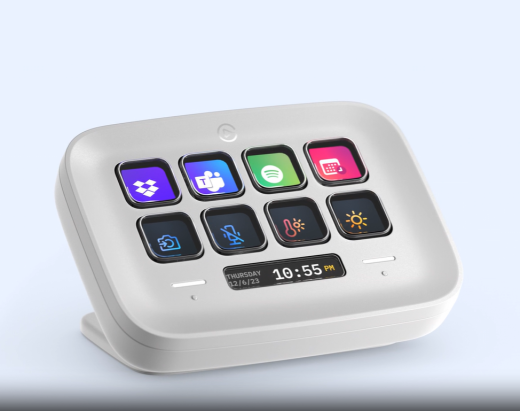
A Stream Deck earns its place when mute, scene changes or recurring stream actions are interrupting the host. A simple one-scene show does not need it.
 New
New
Only if control is repetitive
Elgato
ELGATO Stream Deck Neo (8x Customizable LCD Keys + 2x Touch Points)
Why we'd pick it
Useful for mute, scene changes and recurring stream actions when the host needs them within reach.
Watch out for
Skip it if the show only uses one scene and a couple of keyboard shortcuts.
Warranty 2 Years Warranty
In stock
MYR589.00
View product →
Price, stock, warranty, condition and pre-owned availability are live from the Altech catalogue.
Choose one
PM422 is the value USB route; Sennheiser Profile is the step-up USB route. You do not need both.
If you already own a good close-positioned microphone, keep it and spend on placement, light, control or camera instead.
Picture upgrade comes second
Move to a camera system when the current picture is the limit.
If the host is already well lit and sounds good but the webcam still looks soft, hunts focus or cannot frame the desk naturally, then the camera + lens + capture route becomes justified.
Optional picture step
Upgrade the host camera only after voice and light are sorted
The camera route makes sense when the existing webcam/phone cannot give you the framing, focus or image quality you want. It is deliberately separate from the starter desk.
![[USED] Sony ZV-E10 II Body Only ( 99% Like New with Box ) / ZVE10M2 ZVE10II ZVE10 Mark II ZVE10 M2 ZVE10 2](https://s3-ap-southeast-1.amazonaws.com/altech-prod/uploads/public/6ab/74c/24d/thumb_120764_520_420_auto.jpeg) Pre-Owned
Pre-Owned
Host camera
Sony
[USED] Sony ZV-E10 II Body Only ( 99% Like New with Box ) / ZVE10M2 ZVE10II ZVE10 Mark II ZVE10 M2 ZVE10 2
Why we'd pick it
A compact creator body for a permanent or semi-permanent host angle that can still be used away from the desk.
Watch out for
You still need a suitable lens, long-session power and capture path.
Condition Pre-loved
Warranty 1 Month Shop Warranty
In stock
MYR3,090.00
See this actual unit →
![[OCT SALES - TNG RM100] Sony E 11mm F1.8 Lens](https://s3-ap-southeast-1.amazonaws.com/altech-prod/uploads/public/6ac/60b/c76/thumb_121403_520_420_auto.jpg) New
New
Tight-room host lens
Sony
[OCT SALES - TNG RM100] Sony E 11mm F1.8 Lens
Why we'd pick it
A wide Sony APS-C prime for small rooms where the camera sits close to the host/monitor.
Watch out for
Specialised view; skip it if your desk already gives enough working distance.
Warranty 1 Year + 1 Year Sony Malaysia Warranty
In stock
MYR1,950.00
View product →
 New
New
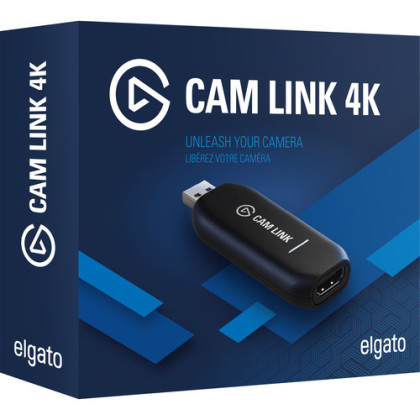
HDMI capture
Elgato
Elgato Cam Link 4K (HDMI Input For Mac / Windows , Video Capture Card)
Why we'd pick it
Adds a compatible HDMI camera to a computer-based live setup without turning the desk into a switcher-based studio.
Watch out for
Confirm clean HDMI, cable/connector and camera power before buying.
Warranty 3 Months Shop Warranty
In stock
MYR579.00
View product →
Price, stock, warranty, condition and pre-owned availability are live from the Altech catalogue.
When the format changes
A recurring guest turns this into a conversation setup.
Do not pre-buy a two-person wireless kit for a show that is solo 99% of the time. But once a second person becomes normal, solve two close voices before buying extra camera angles.
Do not skip the boring checks
The host should not troubleshoot live.
These are the small setup details we would verify before selling more equipment.
Can it stay close without blocking the desk?
Position the arm so the microphone remains near the mouth through normal posture changes.
Close placement is the reason the boom exists.Can the panel stay in a repeatable position?
A fixed host benefits from fixed light. If it gets packed away every time, mark or simplify the placement so the stream does not need re-lighting from scratch.
Repeatability is part of quality.Which actions happen while talking?
Put only those actions on physical control. Everything else can stay in software and off the desk.
Fewer reliable controls beat a panel full of unused buttons.Is the host looking near the lens?
Move the camera closer to the screen/chat position before blaming the body for weak audience connection.
Eye-line is a placement problem first.Browse by the role you are missing
Do not turn a four-part desk into a twelve-item cart.
Use the exact shelf first, then broaden only the role that needs another option.
Related one-person setups
Use the sibling page when the job changes.
Gaming adds game/OBS load. Facecam goes deeper on camera geometry. Solo Host covers a broader one-person show with more sources or repeatable production actions.